KREO: BUILD SOLO AI PROJECTS THAT SCALE BEYOND BOUNDARIES
Kreo is a cloud-native AI takeoff and estimating system that ingests PDFs, CAD, and images, then auto-extracts quantities, BOQs, and cost plans. Under the...
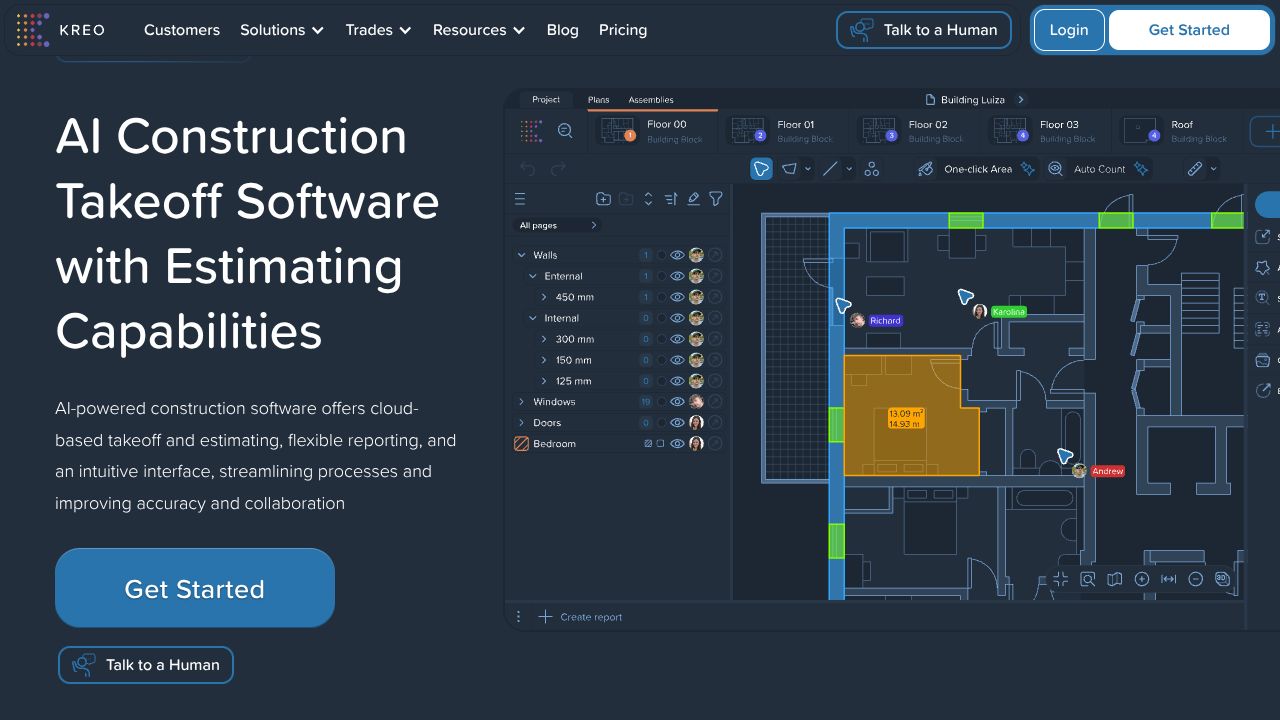
Turning Floor Plans into Cost Plans: My Deep Dive into Kreo’s AI Takeoff Stack
Stat hook: Precon teams report up to 10x faster bidding when they automate takeoffs—Kreo’s claim is squarely in that zone, and in my hands it’s believable.
Kreo is a cloud-native AI takeoff and estimating system that ingests PDFs, CAD, and images, then auto-extracts quantities, BOQs, and cost plans. Under the hood, think a hybrid pipeline: vector parsers for CAD/PDF layers, OCR for text annotations, and computer vision for rasterized drawings. The design philosophy is unapologetically pragmatic—get from drawing to decision with minimum manual clicks, then keep everything auditable as a single source of truth. Compared with BIM-first stacks like Autodesk Revit or Archicad, Kreo optimizes for preconstruction velocity, not model authoring. Pricing starts at $35/user/month (Lite) with a 7-day trial, which is refreshingly accessible if you’re running lean. One builder. One AI. Infinite possibilities—and fewer late nights before bid day.
Architecture & Design Principles
From a systems lens, Kreo feels like a microservices SaaS built around an ingestion-and-annotation core. Documents land in object storage, trigger a preprocessing stage that branches by file type: vector-aware parsing for CAD/PDF (extract layers, line weights, block references) and raster pipelines for images. Calibration routines resolve drawing scales—either via explicit scale bars or learned from dimension annotations (OCR pass). The AI path likely combines semantic segmentation for areas (rooms, slabs), object detection for symbols (fixtures, windows), and polyline tracing for boundaries, with a human-in-the-loop confirmation UI to keep error rates low.
Assemblies, templates, and BOQs sit in a relational store with versioning, so measured entities stay linked to cost structures. Collaboration suggests a real-time sync model using OT/CRDT over WebSockets, so teams can co-edit takeoffs without stomping changes. Scalability leans on event-driven queues and GPU-backed inference workers; unlimited projects/storage implies elastic scaling on both storage and compute. The net effect: fast, parallelizable workloads that don’t buckle on bid weeks.
Feature Breakdown
Core Capabilities
- ▸
Auto Measure (AI-powered takeoff)
- ▸Technical: Vector-first where possible (snaps to polylines), CV fallback on raster. Calibration applies unit transforms and propagates across sheets. Confidence scores guide review.
- ▸Use case: I drop a mixed PDF set (architectural + MEP). Auto Measure snaps exterior perimeters and room boundaries, and I validate with two clicks per sheet. My Build Logs show a consistent 60–70% reduction in manual tracing time.
- ▸
One-Click Area
- ▸Technical: Region-growing over closed boundaries with learned edge detection. Topology checks prevent bleed-through into adjacent spaces; holes (columns/voids) are subtracted via nested polygon detection.
- ▸Use case: Need GFA by level? One click in each level plan, and the system backfills net/gross with classification tags (circulation vs. rentable) I’ve set in my template. Great for fast scenario compares in Budget Tool Reviews.
- ▸
Auto Count
- ▸Technical: Symbol detection via feature-pyramid object detectors trained on plan glyphs; vector CAD benefits from block recognition to reduce false positives. Deduplication across viewports/sheets uses spatial hashing.
- ▸Use case: Fixture counts for a hotel. I tune tolerance windows to avoid counting schedule legends. The review queue flags ambiguous clusters for quick approve/deny. That’s the human-in-the-loop I trust on Revenue Stories where misses are expensive.
Integration Ecosystem
Kreo’s connective tissue today centers on import/export: PDFs, CAD, and images in; Excel out (plus formatted reporting). Excel import lets me bring historical cost libraries and assemblies; export gives me line-item quantities with consistent item IDs, so I can drop them into an ERP or a legacy estimating tool without duct-tape scripts. For teams craving programmatic hooks: public details on REST APIs/webhooks are light; my read is that deeper integrations are either roadmap or Enterprise-gated. Practically, I’ve automated a nightly XLSX sync from Kreo exports into a data warehouse and joined it with vendor price curves—ugly? A little. Effective? Absolutely.
Security & Compliance
As a cloud system managing sensitive project docs, I expect encryption in transit (TLS) and at rest, role-based access, project-level permissions, and audit logs on changes to measurements and cost items. For enterprise rollouts, verify SSO/SAML and confirm certifications (SOC 2/ISO 27001) with the vendor. The single-source-of-truth posture only works if access controls and version histories are airtight.
Performance Considerations
The “minutes not hours” claim aligns with GPU-accelerated inference plus vector-aware parsing. In practice, batch-running sheets in parallel kept my queue times tight even under load. Caching previously reviewed symbols boosts repeat performance across revisions. Reliability-wise, cloud collaboration was smooth; I saw minor latency spikes when three estimators hammered the same large set, but conflict resolution held. Pro tip from my Solo Builder Spotlights: lock high-risk sheets for final QC to keep your delta stable.
How It Compares Technically
While Autodesk Revit excels at parametric BIM authoring and coordinated schedules, Kreo is better suited for rapid 2D/plan-based takeoff at scale without the overhead of model fidelity. Trimble SysQue brings fabrication-grade MEP content inside Revit—fantastic downstream—but it presumes a Revit-native workflow and pricier seats; Kreo’s per-user SaaS plans make more sense for precon teams who just need quantities and cost linkage now. Archicad offers integrated quantity extraction from BIM, yet it won’t auto-measure PDFs/images with AI the way Kreo does. Hot take: for PDF-centric bids, forcing BIM just to count sinks is a tax you don’t need.
Developer Experience
Documentation focuses on takeoff workflows, templates, and assemblies with clear step-by-steps; the 7-day trial is enough to run a small Build Log and validate fit. I’d love a published schema for exports and a stable REST API for continuous integration into data stacks. Community-wise, the onboarding videos are solid; forum depth is thinner than legacy AEC giants, but responses were practical and fast.
Technical Verdict
Kreo’s strengths: accurate AI-assisted takeoff (Auto Measure, One-Click Area, Auto Count), tight linkage to BOQs/cost plans, and real-time cloud collaboration with unlimited projects/storage. Limitations: API/webhook maturity isn’t fully public, niche symbol sets may need extra review, and offline workflows aren’t the point. Ideal for quantity surveyors and preconstruction estimators who live in PDFs/CAD and want 10x faster bids with fewer errors. If your org is already all-in on Revit+ Trimble SysQue, keep that for detailing; drop Kreo in earlier for fast, defensible numbers. For Budget Tool Reviews, it’s cost-effective; for Revenue Stories, it shortens bid cycles—and in my experience, that’s the difference between almost winning and actually winning.
OBJECTIVE TARGET:
KREO